Budgeting guide

How to budget without connecting your bank

Linking a bank is convenient, but it is not required to budget well. A manual system takes a few minutes a week, and many people find they notice their spending more when they enter it themselves.

Updated November 12, 2026 · General information, not financial advice.

Why track manually?

  • You choose what to share. No bank credentials, and only the details you decide to enter.
  • Your bank may not connect. Bank connections depend on the institution and region, and they can break when a bank changes its systems.
  • Cash and shared accounts count too. Cash, a joint account or a card you share are easy to include by hand.
  • Entering a purchase makes you see it. That small pause is often the point.

1. Add the accounts you actually spend from

Start with the two or three accounts where most money moves: usually a chequing account, a credit card and cash. Enter today's balance for each from your bank app or statement. You can add savings or debts later.

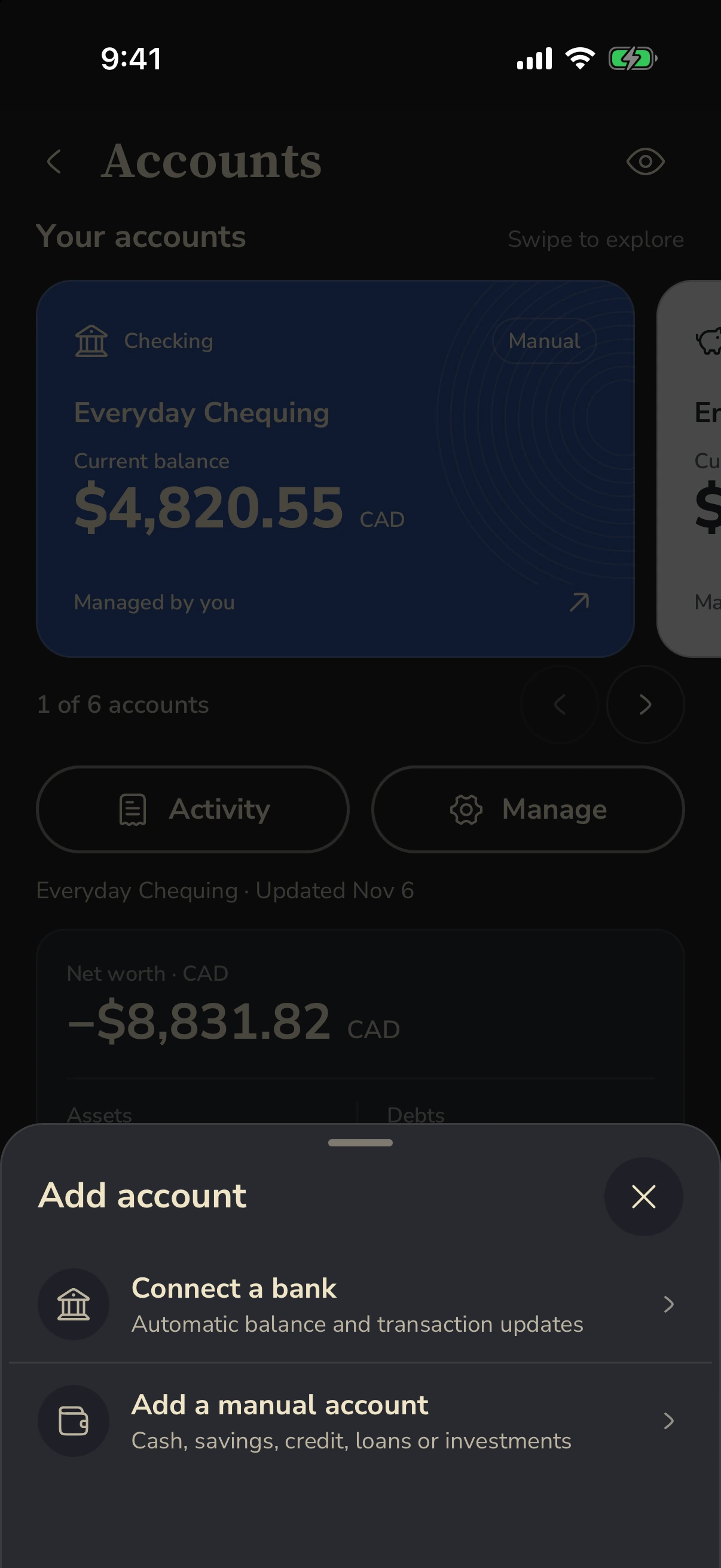
In Fin, choose a manual account when you add an account. You can decide which accounts count toward the cash you can spend and which count toward net worth.

Fin Add account offering a bank connection or a manual account
Real Fin screenshot · synthetic demo data

2. Set limits for a handful of categories

Look at last month's statements and pick the five to eight categories where your money really goes. Give each a monthly limit you can live with. A budget that is a little loose and that you keep is better than a strict one you abandon in week two.

Illustrative monthly plan

Groceries CA$600 · Eating out CA$200 · Transport CA$150 · Shopping CA$150 · Subscriptions CA$60 · Personal CA$100

Rent, bills and savings can sit outside these limits as fixed amounts you plan for at the start of the month.

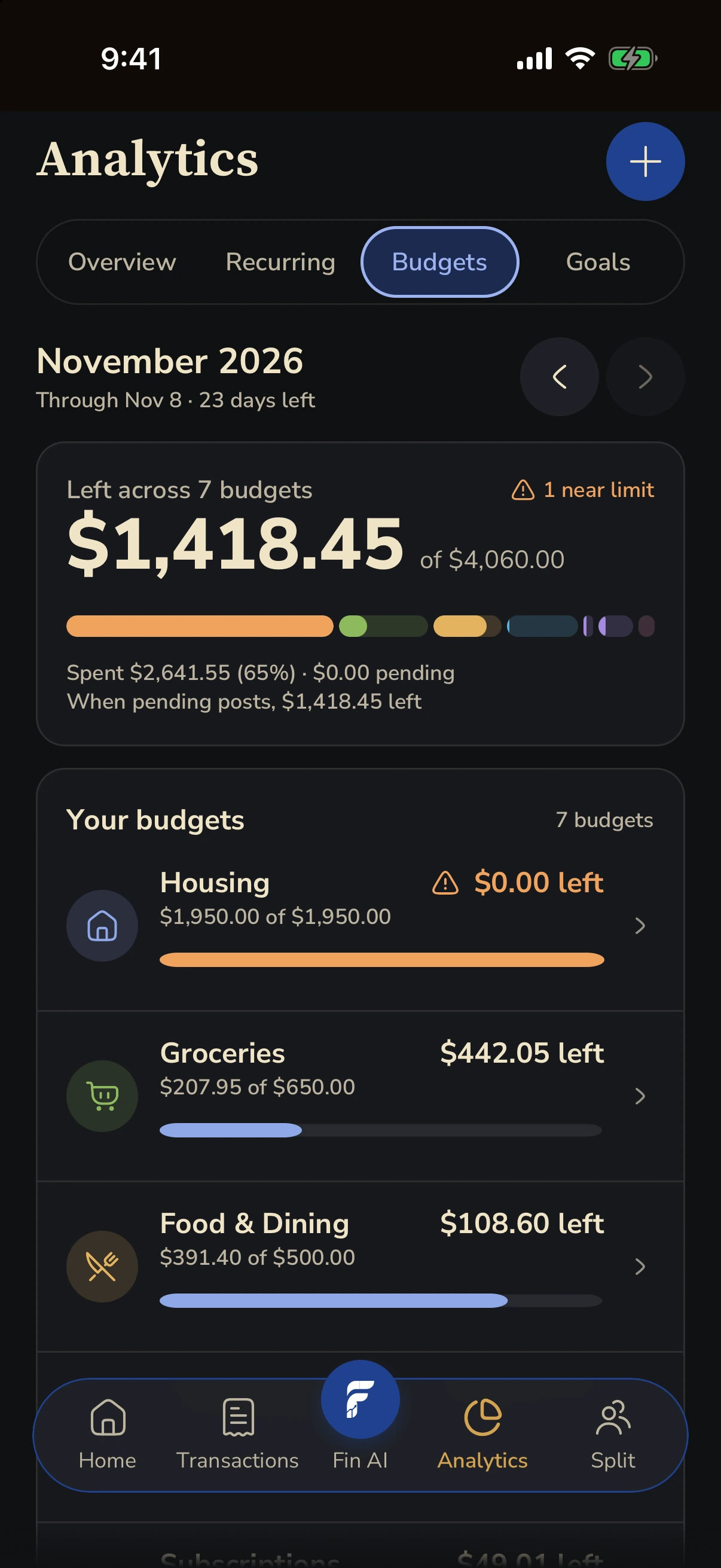
In Fin, set category limits and see posted spending and what remains for each one.

Fin Budgets showing category limits, posted spending and remaining amounts
Real Fin screenshot · synthetic demo data

3. Record spending while you still remember it

The habit matters more than the tool. Two approaches work well:

  • As it happens. Add the purchase before you leave the till. Amount, place and category is enough.
  • One daily catch-up. Two minutes each evening with your bank app open beside your budget.

Fin can also read a receipt you capture so you review the details instead of typing them.

Transfers are not spending

Moving money to savings or paying off a credit card is a transfer between your own accounts. If you track both accounts, record it so both balances stay right, but do not count it against a spending category. The spending happened when you used the card.

4. Check in once a week

Ten minutes, same day each week:

  1. Compare each manual balance with your bank app and adjust it if they differ. A small gap usually means a missed purchase or a fee.
  2. Look at what remains in each category for the rest of the month.
  3. Move money between categories if one is running hot. That is the plan working, not failing.

5. Reset each month

At month end, look at income against spending and at any category you went over. Raise a limit that was never realistic, lower one you never use, and start the new month. Over a few months your limits start to match your real life.

When to connect a bank

If manual entry becomes a chore, a bank connection can import transactions for you. In Fin it is optional and available on eligible plans, depending on your institution and region. Your bank credentials are handled by the connection provider, and Fin never moves money.

More guides

Try it with your own month.

Start with manual accounts. Bank connection is optional.